
In this course we are going to learn 3 sections:
1)Linux Basics

2)Linux Network Administration

3)Linux Server Administration

Linux Architecture:

- Hardware − Hardware consists of all physical devices attached to the System. For example: Hard disk drive, RAM, Motherboard, CPU etc.
- Kernel − Kernel is the core component for any (Linux) operating system which directly interacts with the hardware.
- Shell − Shell is the interface which takes input from Users and sends instructions to the Kernel, Also takes the output from Kernel and send the result back to output shell.
- Applications − These are the utility programms which runs on Shell. This can be any application like Your web browser, media player, text editor etc.
Linux Directory Structure:

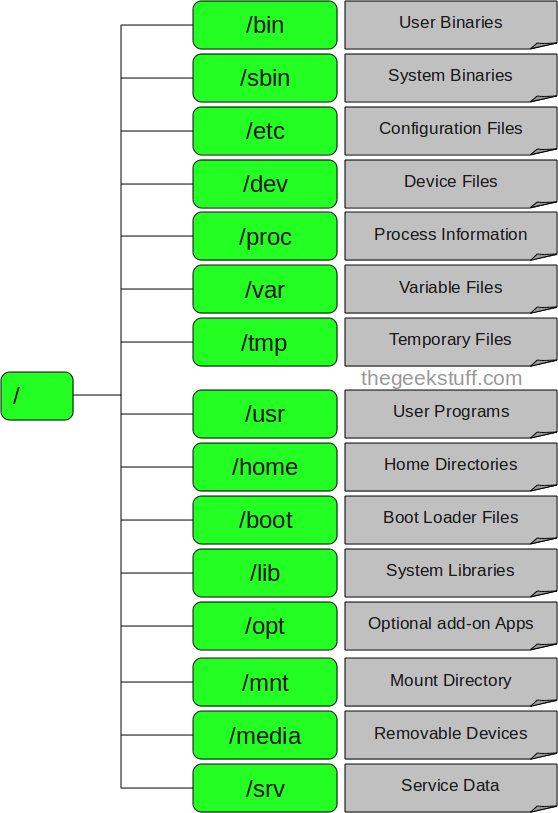
1)bin - It stores all system library files.
2)boot - All the files related to booting the system are stored here.
3)dev - This directory contains special files (device files) corresponding to physical devices or system components.
4)etc - All configuration files resides here
5)lin and lib4 - All library files used by binary files resides here.lib64 contains 64 bit and normal lib 32 bit libraries.
6)media - It is a regular directory which by common practice is used to mount removable media like CD-ROMs, floppy disks, etc.
7)mnt - is a regular directory which by common practice is used to mount other filesystems, usually for a short period of time.
8)opt - for installing optional applications
9)proc - filesystem providing process and kernel information as files
10)root - This is root users home directory.Only root user will access it.
11)run - The /run directory is fairly new, and gives applications a standard place to store transient files they require like sockets and process IDs
12)sbin - It stores all super user binary files.
13)srv - It stores service related information.
14)sys - It stores system related files.
User Administration:
To create and delete users: click here & clear explanation video by 7Hills:click here
File permission changing using chmod: click here & clear explanation video by 7Hills:click here
ACL permission for files: click here & clear explanation video by 7Hills:click here





0 Comments